Slim Scripting |
Scripting Class Hierarchy |
The Slim ObjectThe following is a list of methods defined for the slim object. Each is preceded by the slim handle and followed by appropriate arguments. Click on the individual methods for pertinent details. |
||
BuildShaders ClientCmd ClientMsg CreatePalette FindPalette GetAppearances GetDoGUI GetEncapsulation |
GetEquivalentTypes GetPalettes GetPresentableTemplateName GetRunMode GetTemplates GetWorkspace JournalCmd LoadWorkspaceFile |
ReadSlimFile ReadSlimString ReloadExtensions SavePrefs Shutdown UpdateGUI WindowCmd |
The Workspace ObjectThe following is a list of methods defined for the workspace object. Each is preceded by the workspace handle and followed by appropriate arguments. Click on the individual methods for pertinent details. |
||
AddDirMap AddSearchPath ApplyDirMaps BuildDirs ClearDirMaps ClearSearchPath GetDir GetDirMapZone GetDirMapZoneList GetDirMaps GetDirNames |
GetProjectName GetRootDir GetSceneDir GetSearchPathTypes GetSearchPaths globalizepath IsLocked LocalizePath LockDir LockRootDir |
LockSearchPaths ReloadProjectFile ResolvePath RestoreDefaultPaths RestoreDefaultSetupFiles SetDir SetDirMaps SetProject SetSearchPaths WriteWSFile |
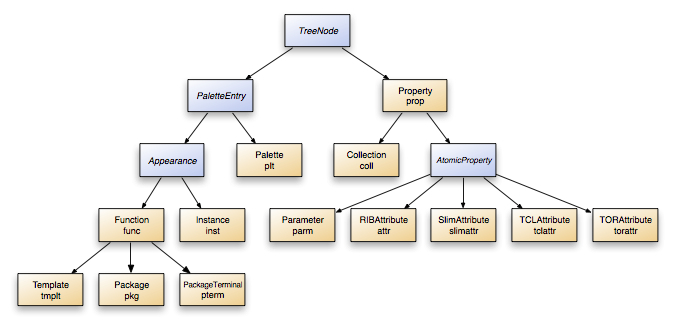
Treenode ObjectsThe TreeNode base class implements the support for organizing objects in tree structures. Refer to the Class Hierarchy diagram to see the list of classes that inherit from TreeNode. Because the classes representing the palettes, appearances, and parameters that you manipulate all inherit from this class, the following methods are common to all of them: |
||
AddChild GetChildren GetDescendants |
GetDrawMode GetParent GetRoot |
RemoveChild SetChildren |
PaletteEntry ObjectsPaletteEntry is a base class that defines a common set of functionality for palettes and appearances. The following methods are defined for these classes: |
||
Delete GenerateID GetDescription GetDisplayLevel GetID GetLabel GetName |
GetType IsDeleted IsDirty IsHidden SetDescription SetDisplayLevel |
SetID SetImage SetLabel SetUserData SetUserDataArray Undelete |
Palette ObjectsIn addition to the methods defined in the PaletteEntry and TreeNode base classes, the following methods are defined for the objects representing the palettes and subpalettes in your scene: |
||
ChangeSaveMode CreateAppearance DeleteDisconnected DeleteEntries DeleteUnused Edit GetAccessMode |
GetAppearances GetFilename GetSaveMode ImportInstance InstantiateApp Internalize Read |
Revert Save SelectAppearances SetAccessMode UndeleteEntries UniqueifyAll UpdateEditor |
Appearance ObjectsAppearance is a base class representing Functions (dynamic nodes that generate a shader) and Instances (which refer to an existing shader). |
||
Attach Detach Duplicate Edit Export GetAttachmentType GetLightType GetMaster GetNamsespace GetPreviewFrame GetPreviewObjSize |
GetPrimitive GetPreviewShadingRate GetProperties GetPropertyTree GetSubtype NewCollection NewParameter NewRIBAttribute NewSlimAttribute NewTCLAttribute NewTORAttribute |
PickObjects PreserveValues PreviewRender Reload RevertValues SetLighttype SetMaster SetNamespace SetSubtype UpdateEditor |
Function ObjectsFunctions are nodes created from a template, and are combined to create a shader. Function is a subclass of Appearance, so Functions support all of the Appearance methods. |
||
BuildShader CreateInstance DeleteNetwork DirtyMaster DuplicateNetwork Flatten GetConnectedAttachables |
GetConnectionClients GetConnectedFunctions GetInstances GetSLSource GetSLSourceType GetObjectID |
GetTemplateID IsDownRev MasterIsDirty UndeleteNetwork UpdateInstances UpgradeTemplate |
Template ObjectsThe Template class is a subclass of Function. You can access the Template object for a function via the GetTemplate method. For your convenience, however, this is usually not necessary. Most methods that access template information like GetSLSource can be called straight from the function. |
||
AddSLDirective SetSLSource SetAdaptor |
||
GetProgenitor GetProgenitorFunction SetProgenitor |
Property ObjectsProperty is a base class representing the Parameters, Collections, and Attributes inside of an appearance. You will mainly deal with subclasses of Property. The only true Property objects are the roots of the Property Tree for each appearance. This root, not visible in the user interface, is accessed using the GetPropertyTree method for Appearances. |
||
BuildDefaultWidget BuildIcon CreateConnection GetAccess GetAppearances GetCommandKey GetConnectedFunction GetConnection GetConnectionStyle GetDetail GetLabel |
GetLabelRef GetName GetMsgHandler GetMsgHandlers GetSubtype GetUserData GetUserArrayData GetValueProvider GetValueProviders SetAccess SetConnection |
SetDetail SetDrawMode SetLabel SetMsgHandler SetState SetUserData SetUserDataArray SetValueProvider SetValueProviderRange |
Collection ObjectsCollection objects are used to group Parameters and Attributes. Since they do not have a value, there is a small number of methods specific to Collection objects. |
||
GetCustomUIName GetCustomUIVendor GetCustomUIModes NewCollection |
NewParameter NewRIBAttribute NewSlimAttribute |
NewTCLAttribute NewTORAttribute SetCustomUI |
AtomicProperty ObjectsThe AtomicProperty base class represents all properties which have a value. Because of this, the majority of the methods listed below relate to the property's value. Parameter and all of the Attribute classes are all subclasses of AtomicProperty, and from a scripting point of view, are relatively similar. |
||
GetArrayIndex GetDefaultValue GetExpression GetValue GetMax GetMin |
GetPrecision GetRange GetTCLContext GetUserRange RevertValue SetArrayIndex |
SetDefaultValue SetExpression SetRange SetTCLContext SetValue ValidateTCLExpression ValidateTCLString |
Parameter ObjectsWhat sets the Parameter class apart from other subclasses is its existence inside of the shader. It is for this reason that the methods specific to Parameter are oriented toward its presencing in shading language. |
||
GetNameSL GetValueSL |
||
Attribute ObjectsAttribute objects represent RIB attributes associated with your shader. There is only one method unique to the Attribute class. |
IsEnabled
ProceduresThe following is a list of procedures available in the Slim scripting environment. |
GetAppName GetEnv GetHostName GetPlatform GetPref |
GetUserName GetVersion ::RAT::GetUniqueID ::RAT::LogMsg |
::RAT::PickFile SetPref ::Slim::ResourceReport ::Slim::SearchReplace |
|
Pixar Animation Studios
|